


SAMMI Extensions
Kick for SAMMI (official)
Kick extension allows you to control and interact with Kick through SAMMI commands and triggers.
Limitations
As of today, the official Kick API is very limited. This extension leverages both the official API and unofficial methods to provide as much functionality as possible. Therefore, some features may be unstable or subject to change if Kick updates their platform.
Features
SAMMI Commands
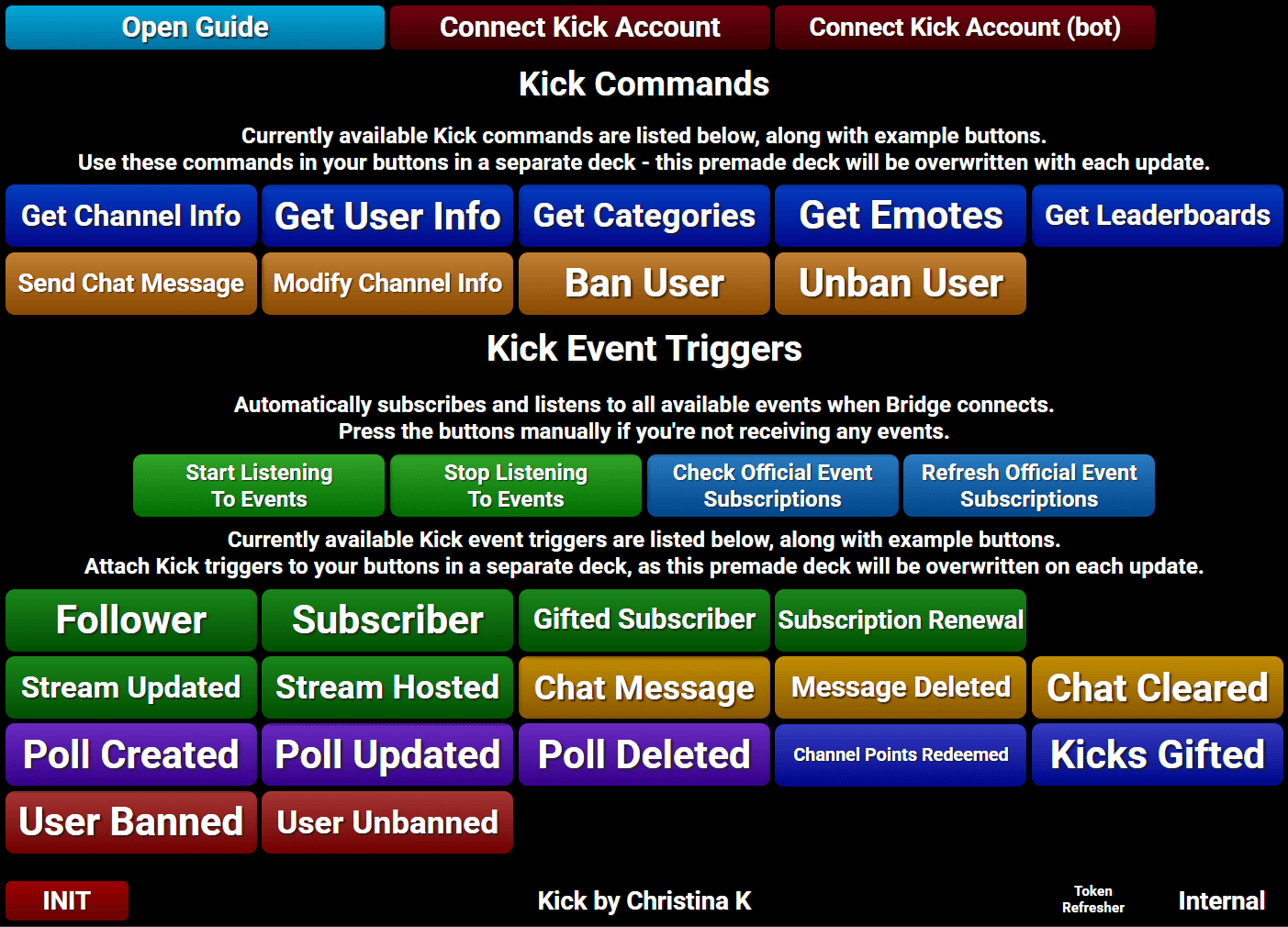
- Get Channel Info
- Get User Info
- Get Categories
- Get Emotes
- Get Leaderboards
- Send Chat Message
- Modify Channel Info
- Ban/Timeout/Unban User
Triggers
- Follower
- Subscriber
- Gifted Subscriber
- Subscription Renewal
- Stream Updated
- Stream Hosted
- Chat Message
- Chat Message Deleted
- Chat Cleared
- Poll Created
- Poll Updated
- Poll Deleted
- Channel Points Redeemed
- Kicks Gifted
- User Banned
- User Unbanned
Connect Bot Account
Add your Kick bot token so SAMMI can send chat messages using your bot account instead of your main channel account.
Replay and log all events
Replay and debug all Kick events via Bridge.
Setup
Install the extension. You can follow the Extension Install Guide.
Connect SAMMI to Bridge. Bridge must always be running and connected for the Kick extension to function.
Retrieve your Kick refresh token:
- Inside Kick's deck in SAMMI, run 'Connect Kick Account' button.
- Login and authorize the extension to access your Kick account below.
- Copy the refresh token once redirected and paste it in the dialog that appeared in step 1.
- Click on 'Ok' to save the token.
Optionally, repeat step 3 to connect a bot account for sending chat messages from a separate account.
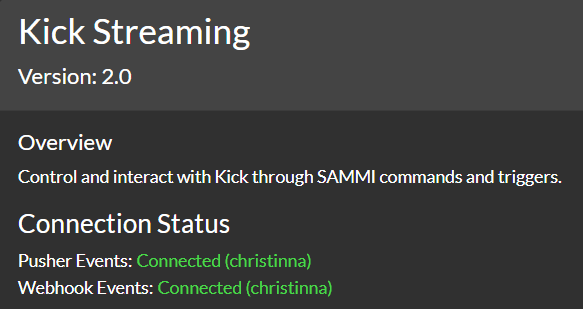
Reload SAMMI Bridge. You should now be connected to Kick, listening for events, and able to use commands. You can verify the connection status in Kick tab in SAMMI Bridge.
Explore the premade Kick deck in SAMMI for available commands and triggers.
Premade Deck Advice
Due to frequent updates to the extension, it's best not to add your own buttons or commands to the premade Kick deck. Instead, use the examples to create your own buttons in a different deck.
Kick Connection
Kick automatically starts listening to events when SAMMI Bridge is connected. You can also manually start or stop listening to events using the buttons in the Kick deck in SAMMI.
To check what official events you're currently subscribed to, run the 'Check Official Event Subscriptions' button.
The Kick connection status can be found in SAMMI Bridge under the Kick tab. Both Pusher Events and Webhook Events should be green for full functionality.
Kick Commands
Kick: Get Channel Info
Retrieves public information for the specified channel. Depending on the type, uses either official or unofficial Kick API.
| Box Name | Description |
|---|---|
| Channel Name | The channel name to get information for (leave blank for own channel) |
| Type | Type of the information to retrieve (all, user ID, Channel ID, Chatroom ID, Channel Description, Banner Picture, Follower Count, Viewer Count, Is Live, Is Mature, Stream Title, Stream Thumbnail, etc.) |
| Save Variable As | Variable Name to save the result into |
Kick: Get User Info
Retrieves user information in relation to your channel.
| Box Name | Description |
|---|---|
| Channel Name | The channel name to get user information for (leave blank for own channel) |
| User Name | The user name to get information for |
| Type | Type of the information to retrieve (all, user ID, Is Subscriber, Is Moderator, Is Follower, Is Banned, etc.) |
| Save Variable As | Variable Name to save the result into |
Kick: Get Categories
Retrieves an array of all categories based on the search query. Returns up to 100 results at a time.
| Box Name | Description |
|---|---|
| Query | The search query to filter categories |
| Page Number | The page number for pagination (default is 1) |
| Save Variable As | Variable Name to save the result into |
Kick: Get Emotes
Retrieves an array of all global or channel emote objects.
| Box Name | Description |
|---|---|
| Channel Name | The channel name to get emotes for (leave blank for global emotes) |
| Type | Type of emotes to retrieve (global, channel) |
| Save Variable As | Variable Name to save the result into |
Kick: Get Leaderboards
Retrieves an array of sub gift leaderboard.
| Box Name | Description |
|---|---|
| Channel Name | The channel name to get leaderboards for (leave blank for own channel) |
| Save Variable As | Variable Name to save the result into |
Kick: Send Chat Message
Sends a chat message to your broadcaster's channel. You can choose to send the message from your bot account or your broadcaster account (if connected).
| Box Name | Description |
|---|---|
| Channel Name | The channel name to send the message to |
| From | Choose whether to send the message from your bot or broadcaster account |
| Message | The message to send |
| Reply To Message ID | (Optional) ID of the message to reply to |
Kick: Modify Channel Info
Modifies your stream title or category ID.
| Box Name | Description |
|---|---|
| Stream Title | New stream title (leave blank to keep current title) |
| Category ID | New category ID (leave blank to keep current category) |
Kick: Ban User
Bans or timeouts a user from your channel.
| Box Name | Description |
|---|---|
| Channel Name | The channel name to ban the user from (leave blank for own channel) |
| User Name | The user name to ban or tinmeout |
| Reason | Reason for the ban or timeout |
| Duration (seconds) | Duration of the timeout in seconds (leave blank for permanent ban) |
Kick: Unban User
Unbans a user from your channel.
| Box Name | Description |
|---|---|
| Channel Name | The channel name to unban the user from (leave blank for own channel) |
| User Name | The user name to unban |
Kick Event Triggers
Follower
Extension Trigger: Kick Follower
Triggers for every new follower.
| Pull Value | Description |
|---|---|
| username | Username of the new follower |
| user_id | User ID of the new follower |
| picture_url | Profile picture URL of the new follower |
| verified | Whether the follower is verified |
Subscriber
Extension Trigger: Kick Subscriber
Triggers when you get a new (non gifted) subscriber.
| Pull Value | Description |
|---|---|
| username | Username of the new subscriber |
| user_id | User ID of the new subscriber |
| picture_url | Profile picture URL of the new subscriber |
| verified | Whether the subscriber is verified |
Gifted Subscriber
Extension Trigger: Kick Gifted Subscriber
Triggers when a viewer gifts subscriber(s) to another viewer(s).
| Pull Value | Description |
|---|---|
| gifter_username | Username of the viewer who gifted the subscription(s) |
| usernames | Array of usernames who received the gifted subscription(s) |
| usernames_detailed | Array of objects containing detailed info of the recipients |
| amount | Number of subscriptions gifted |
| gifter_anonymous | Whether the gifter chose to remain anonymous (1 = yes, 0 = no) |
| gifter_verified | Whether the gifter is verified (1 = yes, 0 = no) |
| created_at | Timestamp of when the gift occurred |
| expires_at | Timestamp of when the gifted subscription(s) expire |
Subscription Renewal
Extension Trigger: Kick Subscription Renewal
Triggers when a subscriber renews their subscription.
| Pull Value | Description |
|---|---|
| username | Username of the subscriber who renewed |
| user_id | User ID of the subscriber who renewed |
| picture_url | Profile picture URL of the subscriber who renewed |
| verified | Whether the subscriber is verified |
| duration_months | Number of months the subscriber has been subscribed |
| created_at | Timestamp of when the renewal occurred |
| expires_at | Timestamp of when the subscription expires |
Stream Updated
Extension Trigger: Kick Stream Updated
Triggers when stream starts or ends.
| Pull Value | Description |
|---|---|
| is_live | Whether the stream is live (1 = live, 0 = offline) |
| title | Title of the stream |
| started_at | Timestamp of when the stream started |
| ended_at | Timestamp of when the stream ended |
Stream Hosted
Extension Trigger: Kick Stream Hosted
Triggers when another channel hosts your channel.
| Pull Value | Description |
|---|---|
| username | Username of the hoster |
| amount | Number of viewers from the host |
| optional_message | Optional message from the hoster |
Chat Message
Extension Trigger: Kick Chat Message *
Triggers for every new chat message. You can replace the wildcard (*) to trigger specific messages.
Wildcard Usage
Do not know what wild cards * are? See wildcards in SAMMI guide.
| Pull Value | Description |
|---|---|
| id | ID of the message |
| created_at | Timestamp of the message created |
| created_at | Timestamp of the message created |
| message | The message itself, in plain text, i.e. "hello :sunglasses:" |
| message_stripped | The message itself stripped off of all the emojis |
| message_raw | The original message containing all the emojis |
| user_id | User ID of the viewer who sent the message |
| username | Username of the viewer who sent the message |
| color | User chat color |
| role | Role of the viewer who sent the message (Channel Host, Moderator, etc.) |
| picture_url | Profile picture URL of the viewer who sent the message |
| verified | Whether the viewer is verified |
| badge_list | Follower badges of the viewer who sent the message |
| is_moderator | Whether the viewer is a moderator |
| is_subscriber | Whether the viewer is a subscriber |
| is_founder | Whether the viewer is a founder |
| is_broadcaster | Whether the viewer is a broadcaster |
| replied_to_username | username of the user who sent the original message if it's a reply |
| replied_to_message | original message this message replied to |
| replied_to_id | original messages id his message replid to |
| month_subscribed | number of months the user has been subscribed |
| amount_gifted_subscriptions | number of gifted subscriptions the user has gifted |
For listening to messages from specific roles:
Kick Chat Broadcaster Message *triggers for broadcaster messages.Kick Chat Mod Message *triggers for moderator messages.Kick Chat Subscriber Message *triggers for subscriber messages.Kick Chat Founder Message *triggers for founder messages.
Message Deleted
Extension Trigger: Kick Chat Deleted Message
Triggers when a chat message is deleted.
| Pull Value | Description |
|---|---|
| id | ID of the deleted message |
| ai_moderated | Whether the message was deleted by AI moderation (1 = yes, 0 = no) |
| violated_rules | Array of rules violated that caused the deletion |
Chat Cleared
Extension Trigger: Kick Chat Cleared
Triggers when the chat is cleared. (No data provided.)
Poll Created
Extension Trigger: Kick Poll Created
Triggers when a new poll is created.
| Pull Value | Description |
|---|---|
| poll_name | Title of the poll |
| duration | Duration of the poll |
| choice_amount | Number of poll choices |
| vote_total | Total number of votes (initially 0) |
| choice_1_info - choice_6_info | Object containing the choice details (id, label) |
Poll Updated
Extension Trigger: Kick Poll Updated
Triggers when an active poll is updated, such as when a vote is cast.
| Pull Value | Description |
|---|---|
| poll_name | Title of the poll |
| duration | Poll duration remaining |
| choice_amount | Number of poll choices |
| vote_total | Total number of votes |
| choice_1_info - choice_6_info | Object with choice information (id,label,votes) |
Poll Deleted
Extension Trigger: Kick Poll Deleted
Triggers when a poll is deleted. (No data provided.)
Channel Points Redeemed
Extension Trigger: Kick Channel Points Redeemed
Triggers when channel points are redeemed.
| Pull Value | Description |
|---|---|
| redeem_name | Name of the redeemed reward |
| user_id | User ID of the redeemer |
| username | Username of the redeemer |
| message | Message from the redeemer if user input is required |
| color | Background color associated with the redeemed reward |
Kicks Gifted
Extension Trigger: Kick Kicks Gifted
Triggers when a user gifts Kicks (similar to bits) in your stream.
| Pull Value | Description |
|---|---|
| user_id | User ID of the user who purchased the gift |
| username | Username of the user who purchased the gift |
| verified | Whether the user is verified |
| picture_url | Profile picture URL of the user |
| amount | Amount of Kicks the user spent |
| gift_name | The name of the gift the user purchased |
| gift_type | The type of the gift the user purchased |
| gift_tier | The level of the gift the user purchased |
| message | Custom user message |
| pinned_time | How long the message remains pinned in the chat |
User Banned
Extension Trigger: Kick User Banned
Triggers when a user is banned or timed out in your stream. At this time, there is no distinction between a ban and a timeout.
| Pull Value | Description |
|---|---|
| user_id | ID of the banned user |
| username | Username of the banned user |
| profile_picture | Profile picture URL of the banned user |
| banned_by_id | ID of the user who issued the ban |
| banned_by_username | Username of the user who issued the ban |
| banned_by_profile_picture | Profile picture URL of the user who issued the ban |
| reason | Reason for the ban or timeout |
User Unbanned
Extension Trigger: Kick User Unbanned
Triggers when a user is unbanned.
| Pull Value | Description |
|---|---|
| user_id | ID of the unbanned user |
| username | Username of the unbanned user |
| unbanned_by_id | ID of the user who issued the unban |
| unbanned_by_username | Username of the user who issued the unban |
Replaying Kick Events
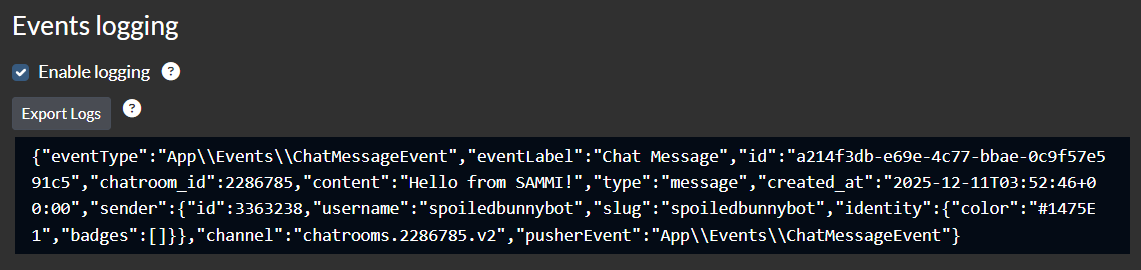
If you wish to replay an earlier event, navigate to the Kick tab in SAMMI Bridge and click on the Replay event button next to the desired event. Logging must be enabled to see past events.

Troubleshooting
If you notice that Kick events or commands are not working as expected, please ensure that:
- SAMMI Bridge is running and connected.
- Kick Deck in SAMMI is installed and enabled
- Your Kick account is properly connected in SAMMI Bridge (check the Kick tab for connection status).
- You can try reconnecting your Kick account by following step 3 in the Setup section.
Events Logging
To help with troubleshooting, you can enable event logging in the Kick tab in SAMMI Bridge. This will log all incoming Kick events you can review or export for further analysis.
Get Help
Please see Troubleshooting for common extensions issues.